Fast to write and change
A screen is a dozen lines of YAML, not a page of HTML or an hour in a design tool.


Static HTML you can host or open from disk, plus PDF and PNG export. It looks like a sketch, so nobody mistakes it for the final design.
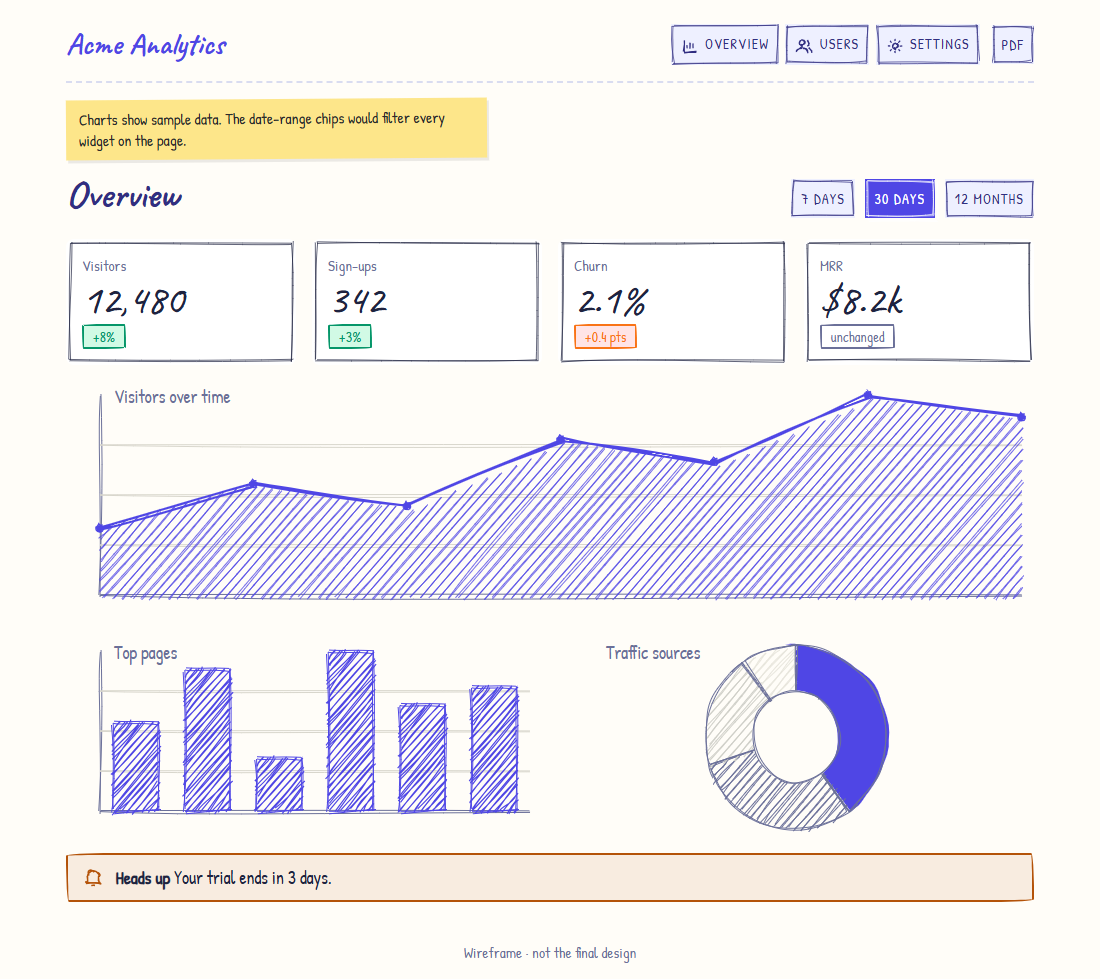
The preview is the real output of the YAML next to it. No design tool, no HTML. One line picks the theme, and tone colours any part.
name: Acme Analytics
theme: color
nav:
  - { icon: chart, label: Overview, go: overview }
  - { icon: users, label: Users, toast: Users screen }
  - { icon: plus, label: Invite, open: invite }
screens:
  - id: overview
    blocks:
      - type: row
        between: true
        children:
          - { type: h1, text: Overview }
          - { type: chips, options: [Week, Month, Year], active: 1 }
      - type: grid
        cols: 4
        children:
          - { type: stat, label: Visitors, value: "12,480", delta: +8% }
          - { type: stat, label: Sign-ups, value: "342", delta: +3% }
          - { type: stat, label: Churn, value: 2.1%, delta: "+0.4", trend: down }
          - { type: stat, label: MRR, value: $8.2k, delta: ±0, trend: flat }
      - { type: chart, kind: area, h: 240, label: Visitors over time }
      - type: grid
        children:
          - { type: chart, kind: bar, h: 200, label: Top pages }
          - { type: chart, kind: donut, h: 200, label: Traffic sources }
      - { type: alert, kind: warning, text: Your trial ends in 3 days. }
modals:
  - id: invite
    title: Invite a teammate
    children:
      - { type: input, label: Email, placeholder: sam@team.com }
- { type: button, label: Send invite, primary: true, close: true }Want a bar chart, a login form or pricing cards? Copy one from the recipes, or click through the full examples.
npx openink init my-wireframes
cd my-wireframes
npx openink dev                 # live preview at http://localhost:3000
Requires Node 20+. Read the getting started guide next, or click through the live examples.